
Moudir.ai
Introduction
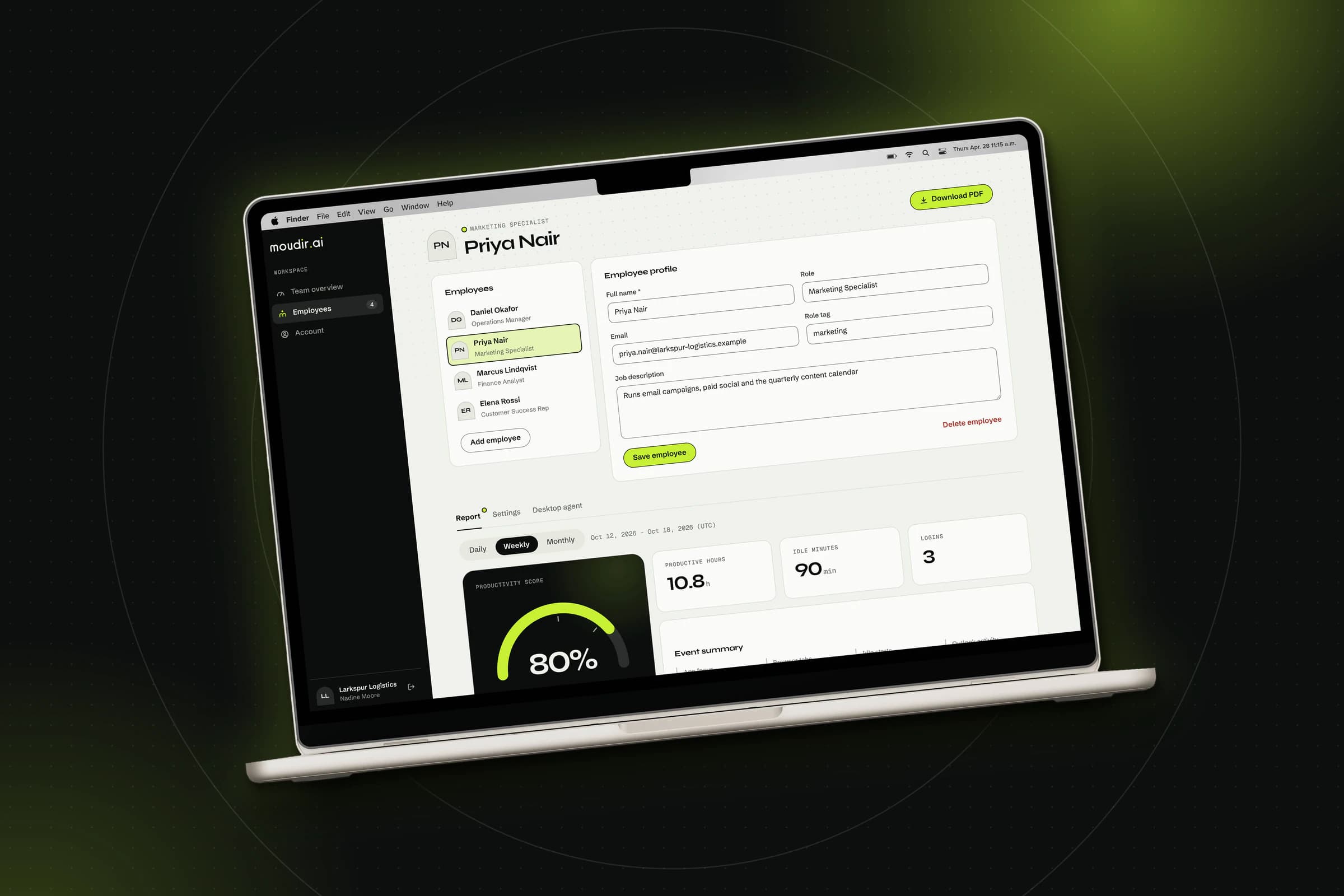
Moudir.ai is a B2B workforce-insight platform that gives managers a daily, weekly and monthly view of how their team works on the computer. A lightweight agent installed on each employee's Windows PC records high-level activity, such as the application in focus, browser tab titles and idle periods, and a central server turns those events into productivity scores, trends and PDF reports that managers read through a web dashboard.
Instead of positioning itself as a surveillance tool, the platform is built around one rule: collect only what the score needs, and make every score explainable. There is no keystroke logging, no screenshots, no email or message content and no full web addresses, and the scoring engine is a rule-based model with documented formulas and adjustable weights rather than a black-box model. A manager can always see exactly why a day received its score.
Moudir.ai is multi-tenant by design. Every company that signs up gets its own isolated workspace with its own managers and employees, which makes the product sellable to any company with many employees to look after. It was designed and built from scratch as a pilot during my internship in the Enterprise Development unit, and tested with demonstration data.
The Challenge
Workplace monitoring tools often fall into two camps. Some capture everything, from screenshots to keystrokes, which erodes trust and turns a management tool into surveillance. Others reduce a person's day to a single number that nobody can explain, which is hard to act on and easy to dispute.
Moudir.ai was built to answer a specific question:
How do we give managers a trustworthy picture of how a team works, without watching individuals and without a score nobody can explain?
Challenges included:
Collecting activity silently from employee PCs, without losing data when a PC is offline
Keeping every company's data strictly separate inside one shared system
Letting a manager adjust how each employee is evaluated according to their role
Producing daily, weekly and monthly scores that are simple to explain and honest about what they cannot measure
Core Features
Team Overview
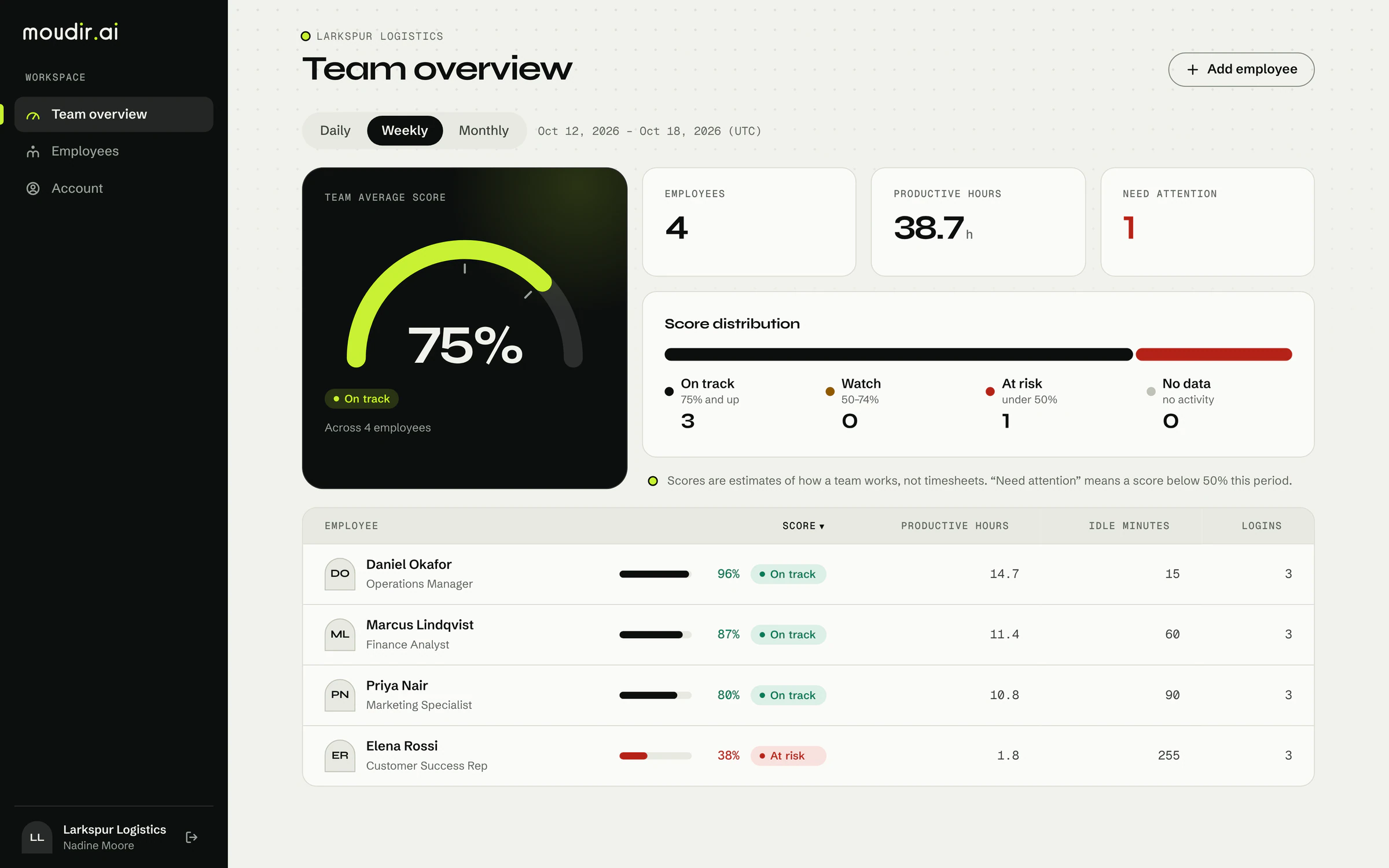
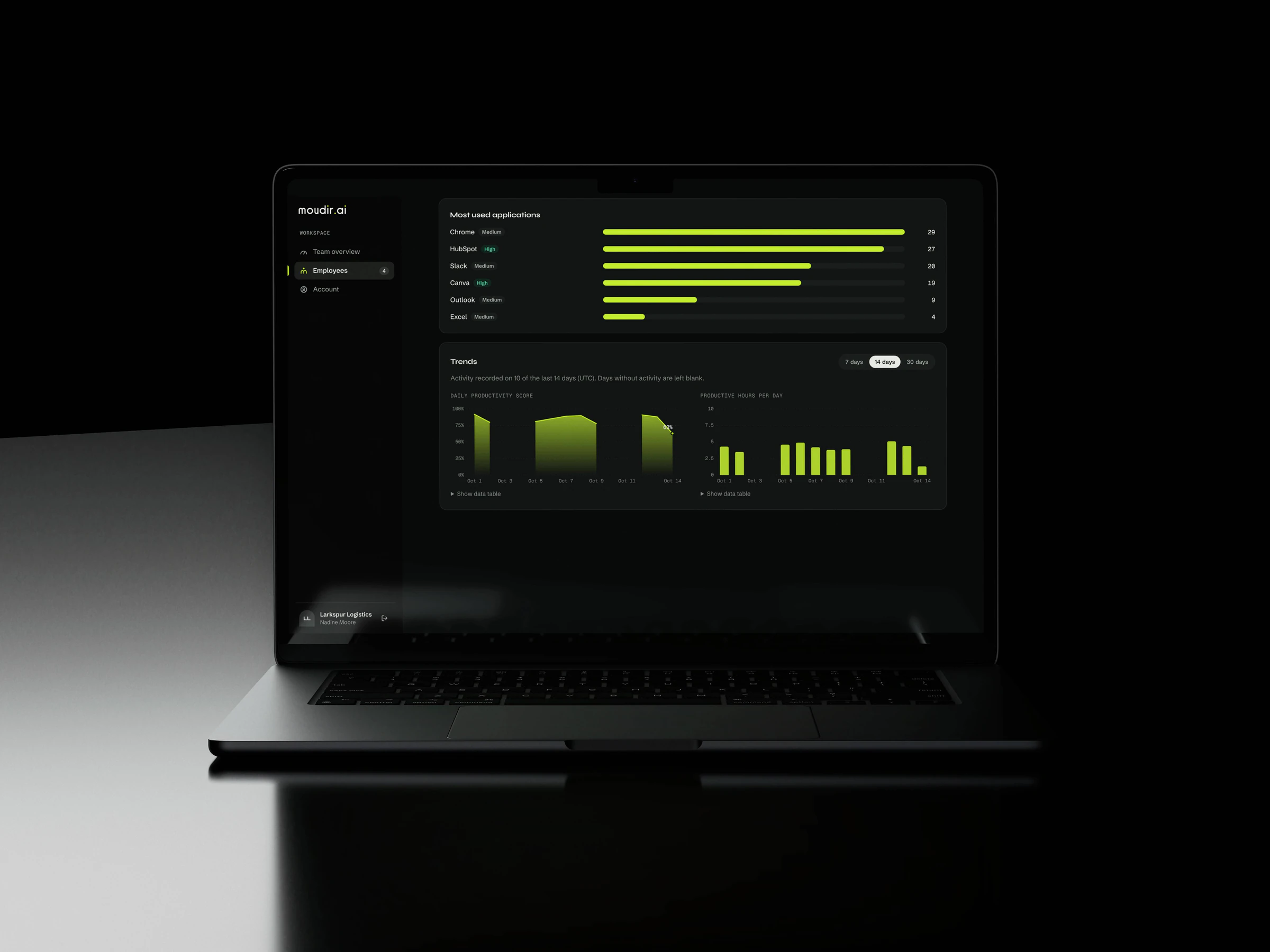
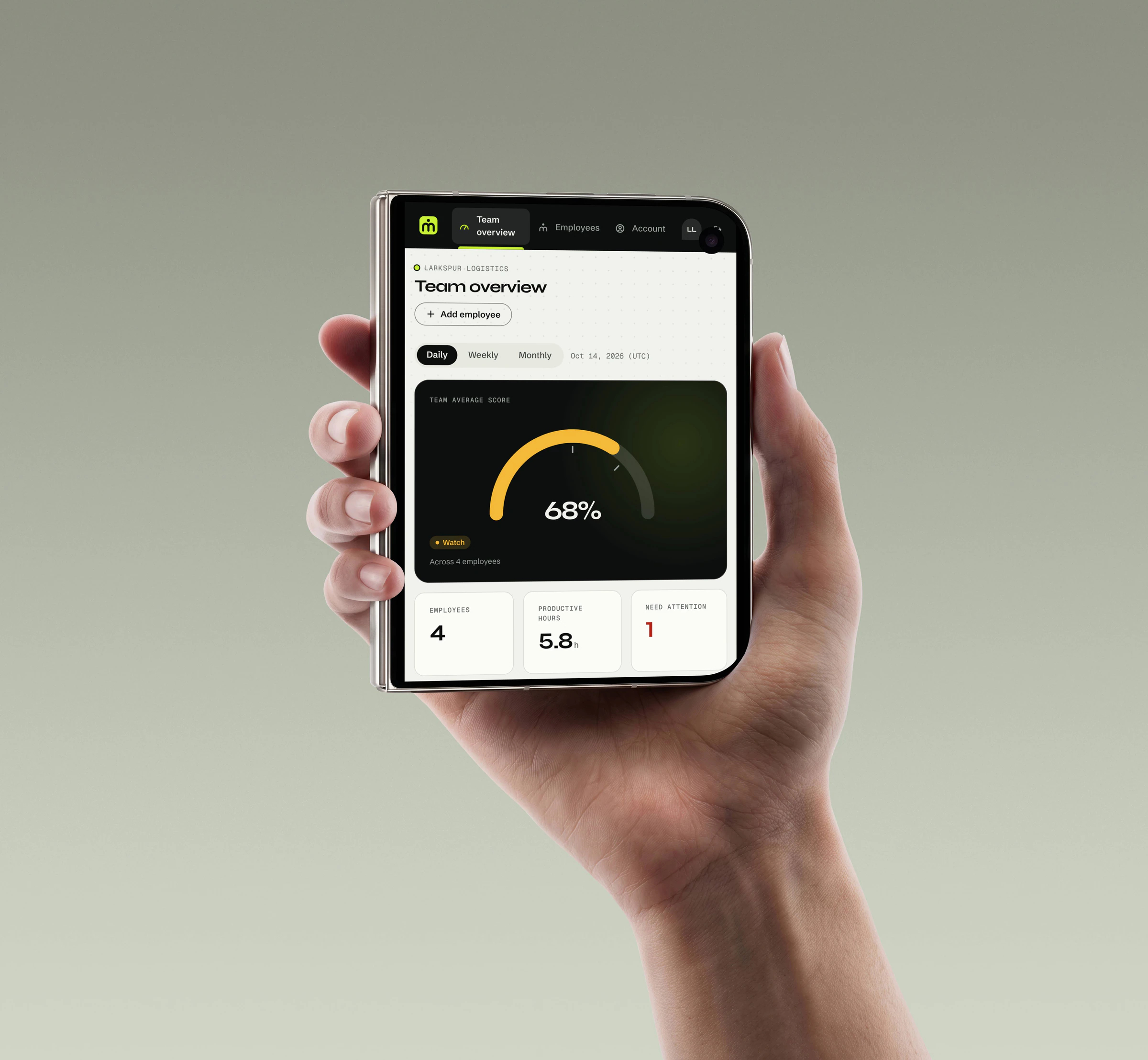
The landing page of the dashboard compares the whole team at a glance: an average team score shown as a gauge, the number of employees, estimated productive hours, and how many people need attention. A sortable table ranks every employee by score or idle time, so a manager sees who is on track and who is slipping without opening a single profile.
Explainable Productivity Scores
Every day with activity receives a score between 0 and 100%, built from four sub-scores: application usage, browser activity, punctuality and idle behavior. Scores map to three clear states, On track (75% and above), Watch (50% to 74%) and At risk (below 50%). Instead of a mysterious rating, each report shows the raw event counts behind the number.
Daily, Weekly and Monthly Reports
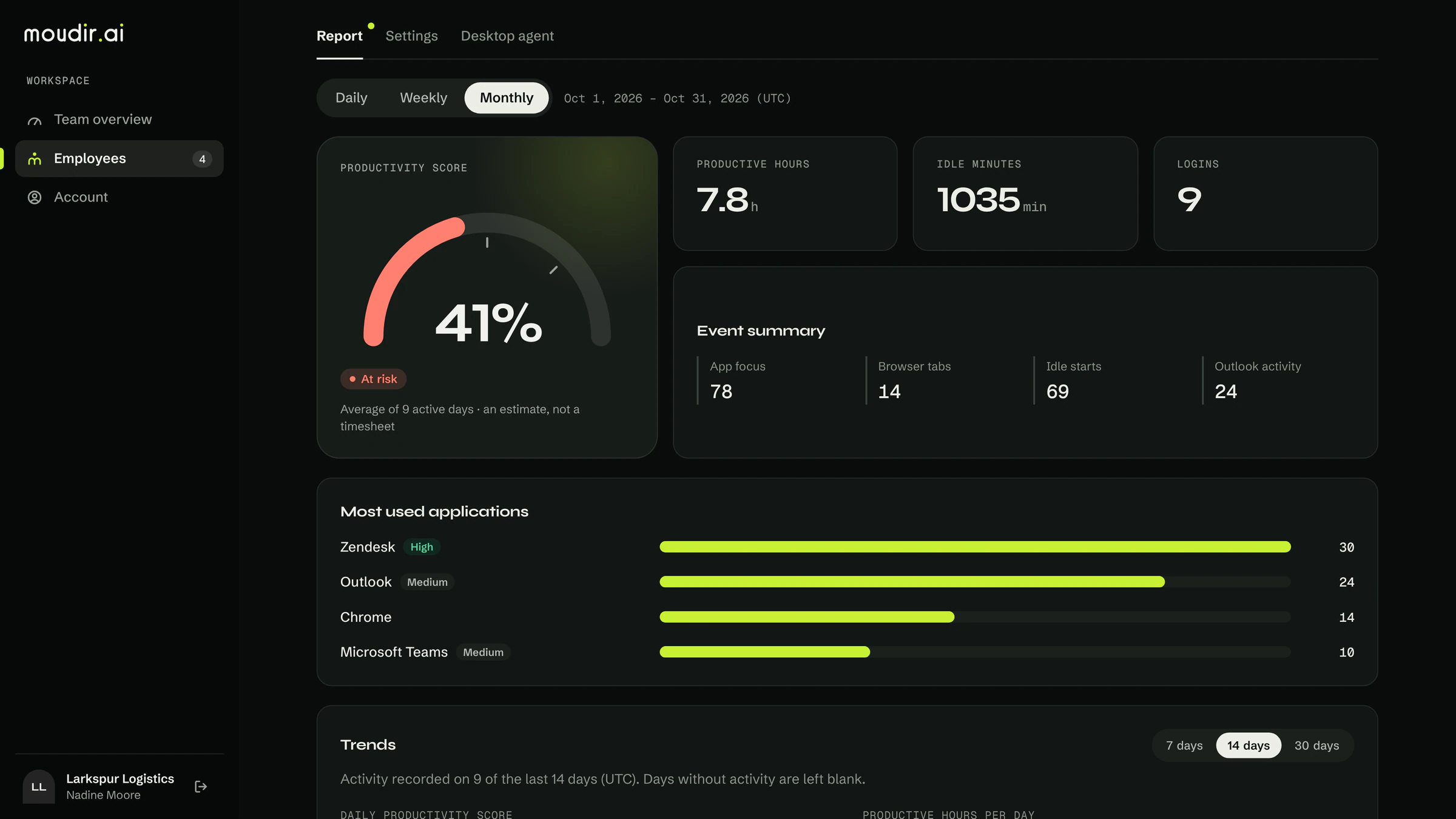
Each employee has a profile with a score gauge, key figures, an event distribution and a ranked chart of their most-used applications. The same report can be switched between daily, weekly and monthly views, and any report can be downloaded as a branded PDF.
Trend Charts
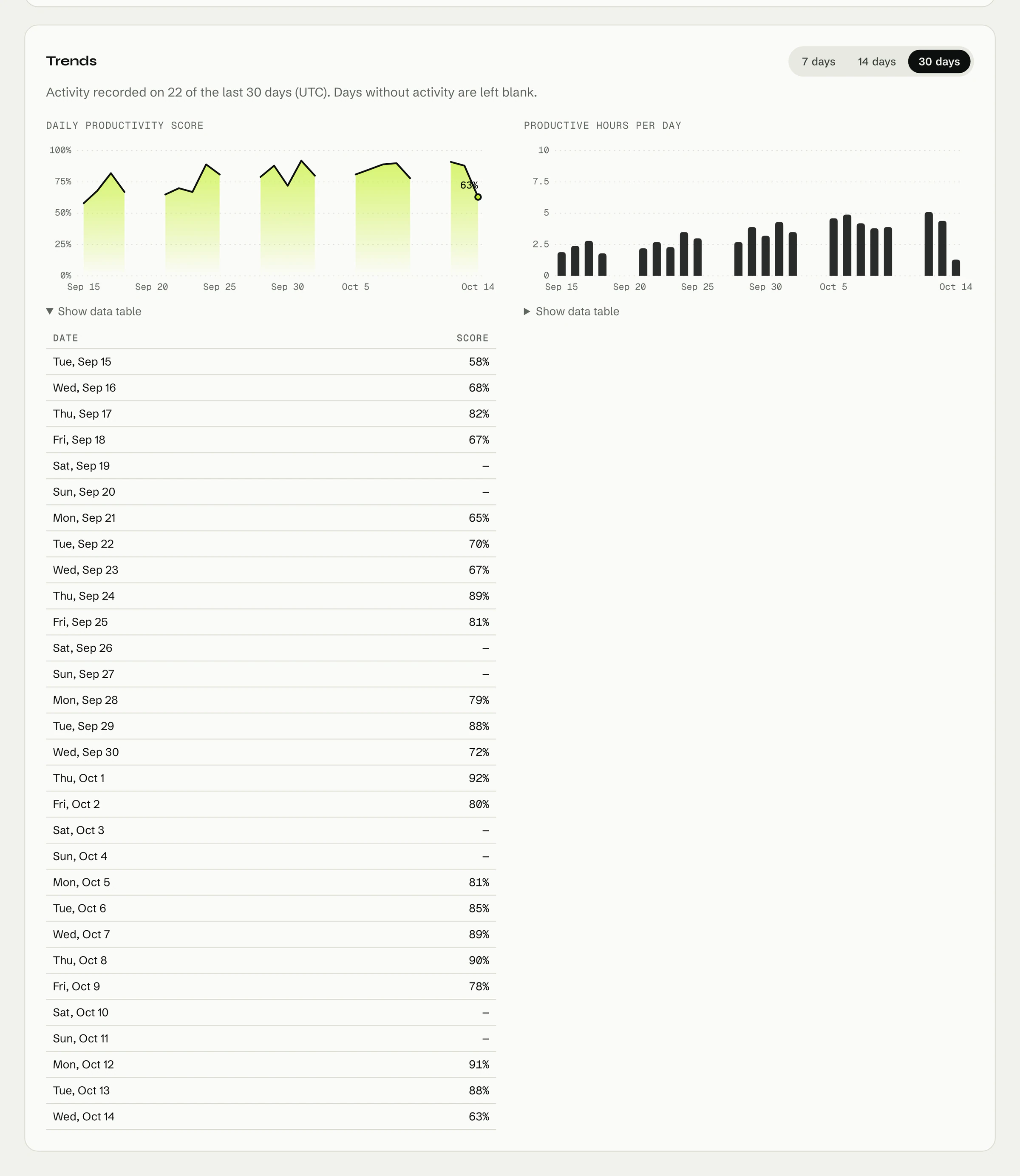
A trend chart plots the daily score over the last 7, 14 or 30 days, with an expandable data table underneath for anyone who prefers the numbers. Days without activity are left blank instead of being drawn as zero, so weekends do not look like failures.
Per-Employee Scoring Settings
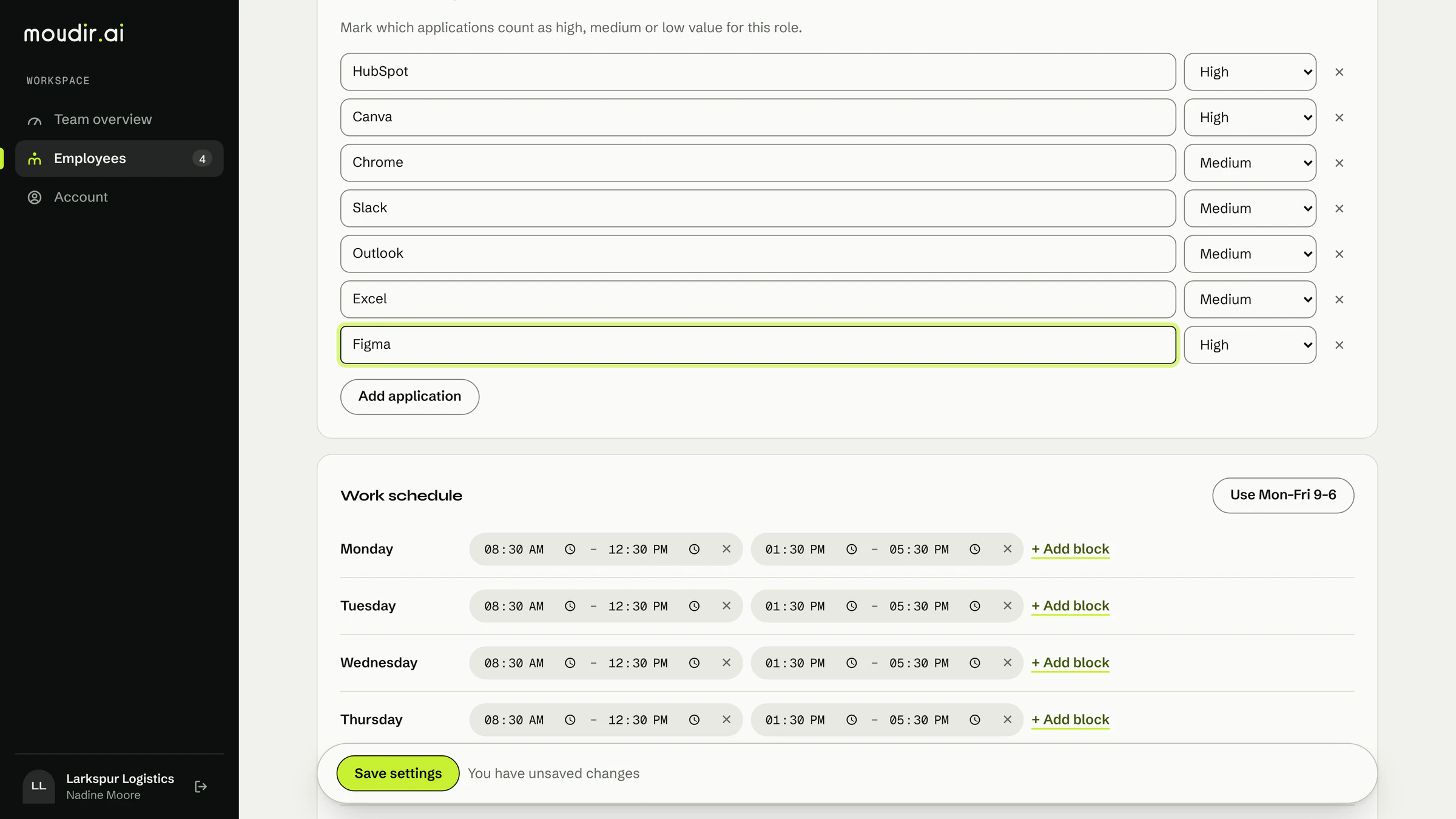
A developer and a support agent do not work the same way, so the weight of each scoring category can be adjusted for each employee. The settings screen enforces that the weights total exactly 100%, lets the manager mark specific applications as high, medium or low importance, and stores a work schedule with several time blocks per day to allow for a lunch break.
Desktop Agent Management
Each employee has a personal agent token generated from the dashboard. The token is shown once, can be rotated at any time, and generating a new one immediately invalidates the old one.
Company Accounts and Managers
A company creates its own account on sign-up and becomes the owner. The owner can add other manager accounts, and every manager can change their own password. Employees can be added, edited and permanently deleted, which removes their settings and all their activity.
Light and Dark Mode
The entire interface follows the device theme, with a full light and dark design built from the same brand tokens.
The Scoring Engine
The scoring engine is the core of the product, and it is deliberately simple. Instead of training a model, Moudir.ai calculates scores with fixed, documented rules that a manager can read aloud. This is a conscious contrast with a black-box approach: in a workplace, a score that can be explained matters more than a clever one that cannot.
Each day with at least one recorded event receives a score between 0 and 1, combining four sub-scores:
Application usage: the number of focused-application events, reaching the maximum at 20 or more in a day
Browser activity: the number of browser tab switches, reaching the maximum at 15 or more in a day
Punctuality: full marks if the employee logged in that day
Idle behavior: starts at full marks and loses 0.15 for every idle period recorded
By default these are weighted 40%, 20%, 20% and 20%, and a manager can change the weights for each employee.
\text{Day Score} = \min\left(1,\ \max\left(0,\ \sum_i w_i \cdot s_i\right)\right)A weekly or monthly score is the average of the daily scores on days with activity. Days with no events at all are left out instead of counted as zero, and the report states how many days were averaged. If a period has no activity, the dashboard shows "No data" rather than a misleading score.
Scoring each day on its own was a deliberate design decision. An earlier approach scored a whole period at once, which meant 20 focus events looked like a full day over a single day but almost nothing over a month. Scoring per day keeps the thresholds meaningful at every period length.
The engine also estimates productive hours and idle minutes from the same events, and every report shows the raw event counts, so the number can always be traced back to what was recorded. Scores are not stored in advance: they are calculated from the raw events each time a report is requested, so changing a weight applies immediately to past days as well.
The scores are honest about their limits. They are rule-based indicators of how a team works, not timesheets, payroll records or performance ratings, and they cannot see meetings, calls or offline work.
A Manager's Workflow
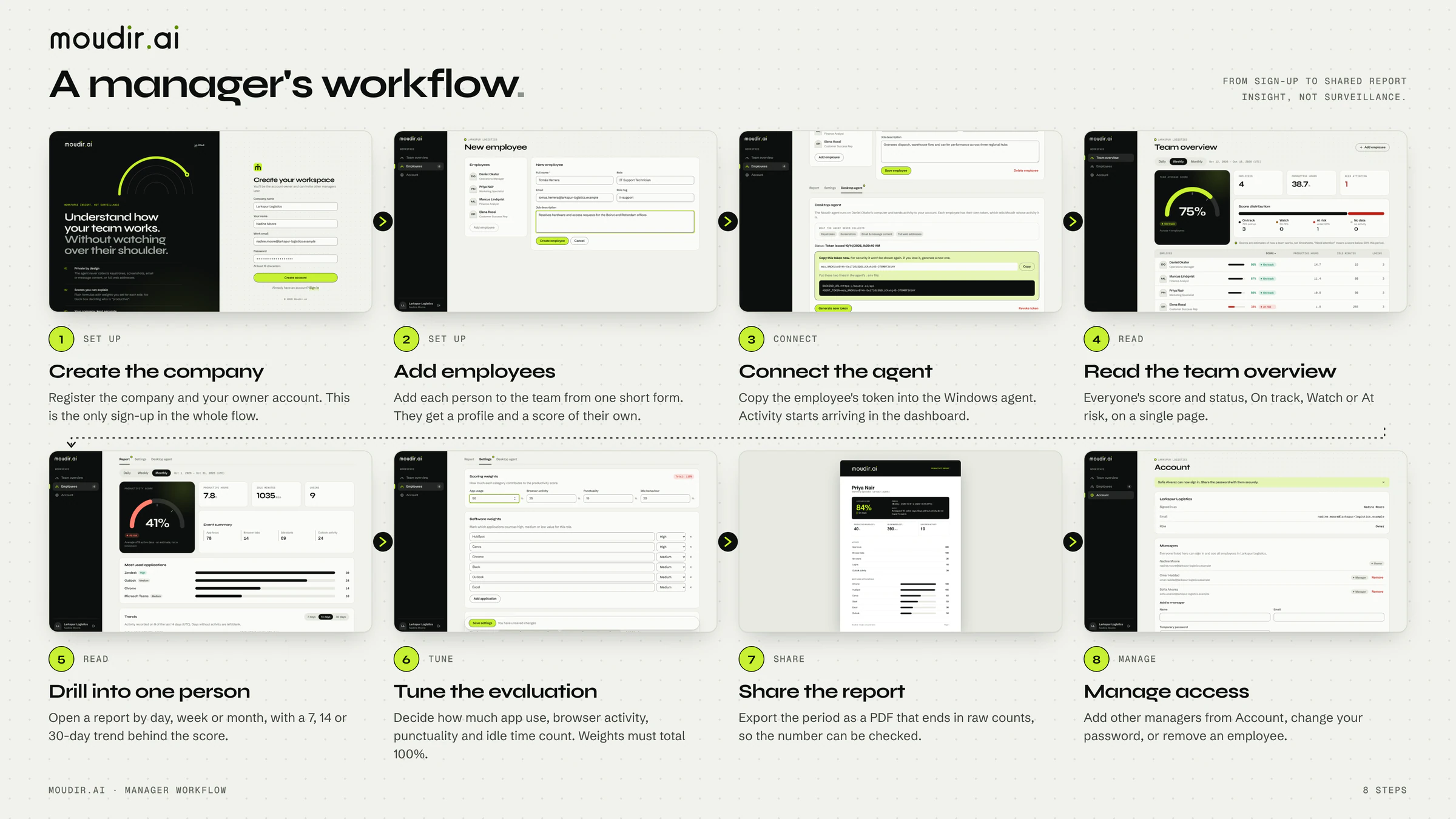
The dashboard is organized around what a manager actually does with the product, from setting up a company to acting on a report.
Create the company. A manager signs up with a company name, their name, an email and a password, and becomes the owner of a new, isolated workspace. Sign-up and sign-in both validate input and show clear errors.
Add employees. Each employee gets a profile with a name, role, email and job description. Duplicate emails inside the same company are rejected.
Connect the agent. From the employee's Desktop agent tab, the manager generates a personal token and copies it into the agent's configuration on the employee's PC. The tab shows whether an agent has been set up for that employee.
Read the team overview. Once events start arriving, the overview shows the team score for the day, week or month, and a table that can be sorted by score or idle time.
Drill into one person. Opening an employee shows their gauge, key figures, event distribution and most-used applications. An employee in the At risk state is easy to spot, and the 7, 14 or 30 day trend shows whether it is a bad day or a pattern.
Tune how they are evaluated. If the score does not fit the role, the manager adjusts the category weights. The screen warns while the total is not 100%, and the change applies to past days immediately.
Share the result. Any report can be exported as a PDF for a one-to-one meeting.
Manage access. The owner adds other managers from the Account page, and anyone can change their own password. Deleting an employee asks for confirmation and permanently removes their data.
Edge cases are handled on purpose: an employee with no data yet shows a clear "No data" state instead of a zero score, and destructive actions such as deleting an employee or rotating a token ask for confirmation first.
The Desktop Agent and Privacy
The agent is a Python program that runs silently in the background on an employee's Windows PC. Every two seconds it checks which window is in the foreground and records an event when the focused application changes. It also records logins and logouts, browser tab titles, Outlook activity and idle periods longer than 60 seconds, using the Windows API for the foreground window and the time since the last keyboard or mouse input.
Events are first saved in a local SQLite queue and then sent to the server in batches of up to 500, so nothing is lost when the network is down. Each agent identifies itself with a personal token sent in a request header, and a token can only add events for its own employee.
Privacy is treated as a design constraint, not a footnote. The platform collects a short, documented list of event types and explicitly excludes everything else:
No keystroke logging, so what an employee types is never recorded
No screenshots or screen recording, and no camera or microphone access
No email or message content, only the fact that Outlook was in focus
No full web addresses, only the page title, so query strings and tokens are never captured
No file scanning, since the agent never reads documents or folders
On the server side, ingestion accepts only the known event types, keeps at most ten short fields per event and truncates text to 500 characters. Deleting an employee permanently removes their settings and all their activity. The project documentation states plainly that these are technical design choices, not legal compliance, and that employers remain responsible for informing employees and having a lawful basis for monitoring.
Technical Architecture
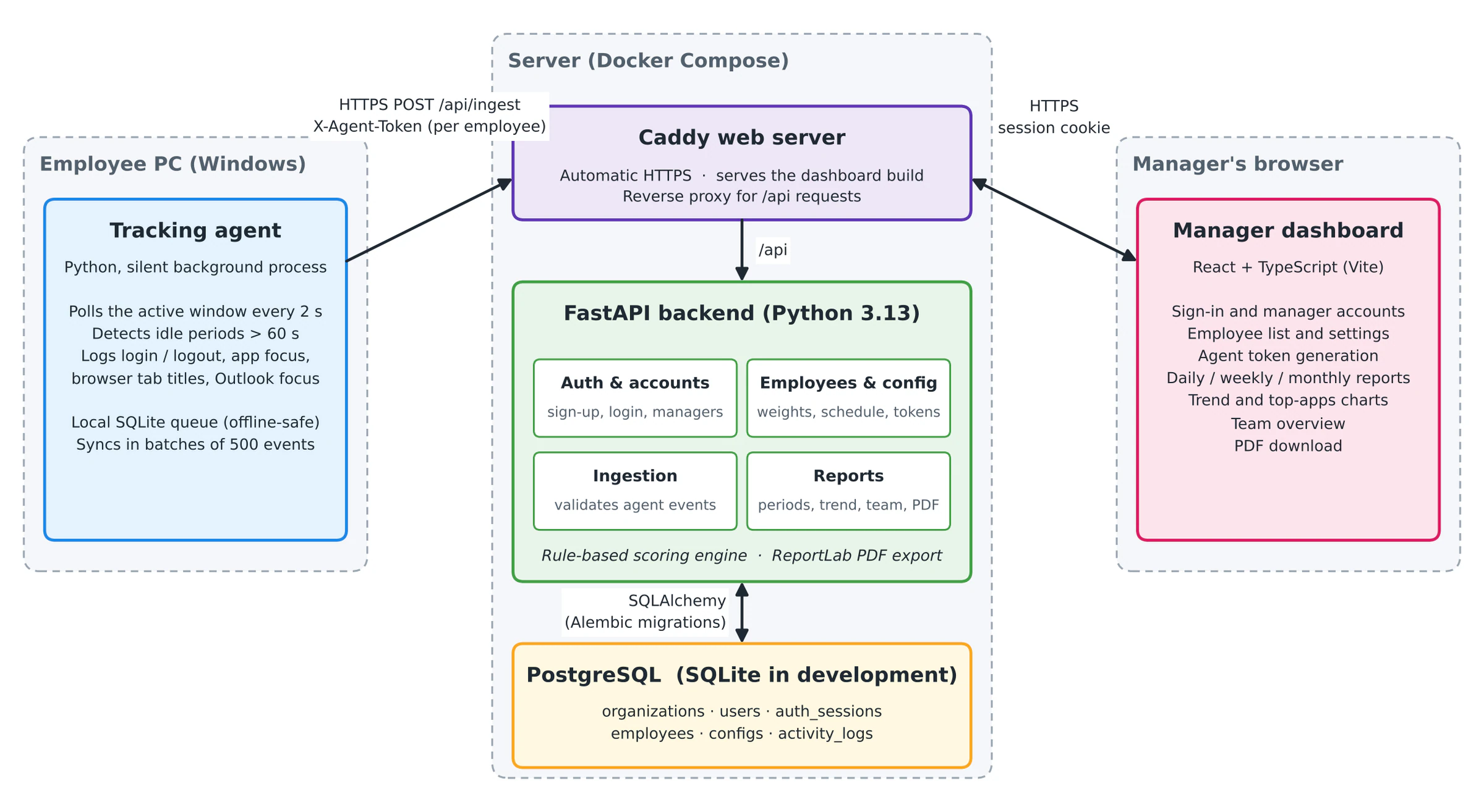
Moudir.ai follows a clean, modular architecture split across three main modules in one Git monorepo, alongside a documentation folder:
Tracking agent: the Python program on the employee's PC
Backend API: FastAPI, Python 3.13, SQLAlchemy and Alembic
Manager dashboard: React 19, TypeScript and Vite
Data moves in one direction, from the agent to the database. The agent sends its batches over HTTPS to an ingestion endpoint, the backend links the events to the right employee, and the dashboard reads reports built from them. In production, Docker Compose runs three containers: Caddy, which serves the dashboard, forwards every /api request to the backend and obtains HTTPS certificates automatically, the FastAPI backend, and PostgreSQL. Because the dashboard and the API share one origin, sign-in uses a first-party HttpOnly, Secure cookie and no cross-origin configuration is needed.
The backend endpoints are divided into four groups: authentication and manager accounts, employees and their settings, ingestion of agent events, and reports. Pydantic validates every request, so malformed events are rejected before they reach the database, and the API documents itself from the same type hints.
Security was built in from the start, not added at the end:
Passwords are hashed with Argon2
Sessions are random tokens in
HttpOnlycookies, stored server-side only as hashes, and revoked on sign-out or password changeAgent tokens are stored only as hashes and can be rotated or revoked at any time
Every request is scoped to the manager's own company, so asking for another company's employee returns a "not found" error
Sign-in attempts are rate limited
PDF reports are generated on the backend with ReportLab, using the same brand colors and wordmark as the dashboard, so an exported report looks like part of the product.
The project also ships with automated tests for the API, authentication, separation between companies, ingestion and scoring, and a GitHub Actions pipeline that runs them, lints and builds the dashboard, checks the database migrations against PostgreSQL and builds the Docker images.
Database Design
The relational schema is managed with SQLAlchemy and Alembic migrations, using SQLite during development and PostgreSQL in production. It consists of six tables:
organizations
users
auth sessions
employees
configs (per-employee scoring settings)
activity logs (the raw events)
The design choice that matters most is what is not stored. Scores are never saved; only raw events are. Every report, trend and PDF is computed from the activity log on request, which keeps the data model small and means a change to the scoring settings is reflected everywhere immediately.
UI and User Experience
Because the product asks employers to monitor people, the interface had to feel calm and trustworthy rather than alarming. The dashboard uses a sidebar app shell on desktop that collapses into a top navigation on phones and tablets, and the team overview and every employee report lead with one dark hero card, the score gauge, so the most important number is the first thing a manager sees. Everything else stays quiet: light surfaces, thin borders and generous spacing.
The brand follows the same idea and is called Ink & Signal. It is built on three colors: Ink (#0C0F0E), Chalk (#F1F2EC) and a bright lime accent called Signal (#C8F135), with a darker Signal Deep (#3F5A00) for links and small text on light backgrounds, where the lime would not be readable. Status colors are reserved for meaning only: green for On track, amber for Watch and red for At risk.
Typography pairs three typefaces, each with one job: Syne for headings and large numbers, Schibsted Grotesk for the interface and reading text, and Geist Mono for labels and timestamps. The Arabic name of the product, مدير, meaning manager, is set in Reem Kufi and used sparingly.
The brand is built on one shape: the arch, which stands for shoulders, a doorway and a gauge at the same time. The logotype is drawn from arches, with the "m" made of two of them, the avatars are arches, and the score is an arch that fills as it improves. A lime dot carries the signal in the logo, the one thing worth looking at. The idea behind it is written into the brand guide: a person, under an arch.
Light and dark mode share a single set of color tokens, with dark mode inverting the surfaces and swapping Signal Deep for Signal. Status colors always travel with a word, so no state is ever communicated by color alone. The tone of the copy follows the brand guide: plain, honest and a little warm, with no words like "spy" or "monitor" and no claim the product cannot prove. The tagline sums up the whole project: Insight, not surveillance.
Collaboration
Moudir.ai was built as a pair project with my teammate Carla. The idea was not given to us: we came up with the product ourselves, so a large part of the early work was deciding what the system should do and, just as importantly, what it should not do.
We worked in parallel in one Git monorepo, with code reviews and agreed points at which the backend and frontend were merged. Carla handled the tracking agent and the collection of activity data on the employee's PC.
I handled the system architecture, the backend and its API contracts, the relational data model, the scoring engine and the automated tests, and I also worked on the dashboard, from the settings screen and team overview to the trend and application charts. I also prepared the platform for production: company accounts with manager sign-in, Argon2 password hashing, per-employee agent tokens, migrations with PostgreSQL support, deployment with Docker and Caddy, and the continuous-integration pipeline. A script that generates five weeks of demonstration data made it possible to test and present the product without any real employee data.
Challenges and Lessons
Deciding what not to collect. The hardest design decision was a subtractive one. Every extra signal would have made the score look smarter, and every one of them would have made the product more invasive. Settling on a short, documented list of events early on shaped everything that followed, from the agent to the privacy documentation.
Scoring each day, not each period. The first version of the engine scored a whole period at once, which made the thresholds meaningless: 20 focus events is a full day of work but almost nothing over a month. Moving to a score per day, averaged over the days with activity, fixed both the thresholds and the weekend problem.
Keeping the agent reliable. An agent that loses data when Wi-Fi drops is worse than no agent. The local queue with batched sync was added for exactly that reason.
Being honest about the limits. In the current version only the category weights affect the score. Software importance, schedules and daily targets are stored and shown, but not yet part of the calculation, and the documentation says so. The same goes for the rest of the known limitations: the agent runs on Windows only, days are bucketed in UTC, and there is no data retention policy yet. Writing these down was part of treating the product as something a company could one day trust.
Small tooling decisions. The Python version was fixed at 3.13 because one dependency (pydantic-core) did not build on Python 3.14.
What's Next
Moudir.ai is a working pilot, and the roadmap is mostly about taking it from a convincing prototype to something a company can rely on:
Use the stored work schedule, minimum productive hours and maximum idle time in the score itself
Email-based password reset, manager invitations and email verification on sign-up
Per-team permissions, two-factor authentication and single sign-on
A data retention policy with a scheduled purge, and per-company time zones
A packaged agent installer with auto-start and auto-update
Pre-aggregated daily scores to support larger organizations
Conclusion
Moudir.ai is not just a dashboard with charts. It is an exercise in building a product whose most important feature is restraint: collecting less, explaining more, and treating the people being measured as part of the audience.
It also gave me the chance to own a product end to end, from the first architecture diagram and the data model to the scoring rules, the security model, the deployment, the tests and the brand. It taught me that in software that measures people, the design decisions that matter most are the ones about what the system refuses to do.
More projects
Sit My Pet
MobileSitMyPet is a mobile platform built to connect pet owners with trusted, verified pet sitters in their community. The application focuses on safety, simplicity, and reliability, allowing pet…
View project
Shortlistr.ai
AIShortlistr is an AI-powered resume screening platform designed to predict whether a candidate would realistically be shortlisted for a specific role or not. Instead of relying on full-text…
View project